Alternatives to WordPress inspired by PHP vulnerabilities
Compare whether to continue with WordPress or move to a static site or managed CMS. We will explain Cloudflare's WAF, inquiry form, and pricing examples for general use and corporate use with illustrations.
After experiencing the response to WordPress vulnerabilities, some people may wonder, ``Can we continue to operate with the same system?'' Even if you are looking for a new destination, there is a lot of technical terminology and it may be difficult to understand what will change.
This article explains how to continue using WordPress and how to change to a different system for people who run personal blogs, hobby sites, and corporate sites. We will also introduce safety measures, contact forms, and price guidelines when using Cloudflare.
Quitting WordPress is not the answer for all sites. By sorting out the ``necessary functions,'' ``person who will update,'' and ``person responsible for maintenance,'' you will be able to find the method that suits you.
This article is a comparison and design consideration based on official materials. It does not present actual results of migration work, attack reproduction, or cost reduction.
The problem this time is in PHP, which is the foundation of WordPress.
WordPress is software for posting and managing articles. One of the mechanisms that supports this operation is PHP, which runs on the server.
In October 2026, the following serious vulnerabilities in PHP were announced. A vulnerability is a weakness in software that can be exploited in an attack.
- CVE-2026-109618:When processing is interrupted due to insufficient memory, post-processing handles incomplete internal data.
- CVE-2026-109619: An issue where internal information pointing to memory that has been used remains, and subsequent requests refer to the old information.
Conditions may allow external parties to execute arbitrary code on your server. This is a separate problem from WordPress itself, so in addition to updating WordPress and plugins, you also need to check for fixes on the PHP side.
The versions in which the fix was first provided are PHP 8.2.35, 8.3.36, 8.4.27, and 8.5.12. Please check the instructions from your hosting company or OS provider for actual support. In addition to the version number, you need to check whether the provider has applied any fixes.
Reference: IPA: Current PHP vulnerabilities and countermeasures / PHP official: OOM processing problem / PHP official: Problem with old internal state remaining
First, check the compatibility status of the service you are using and apply any necessary corrections. Investigation and recovery is also required if a breach is suspected. Simply moving to another service does not mean that the existing infringement has been resolved.
Before looking for an alternative, organize your article writing style and required features
What I would like to start my comparison with is how I usually update. Do you want to write from your smartphone or can you edit the file on your computer? Do you need comments, membership registration, and sales functions? Your options will change accordingly.
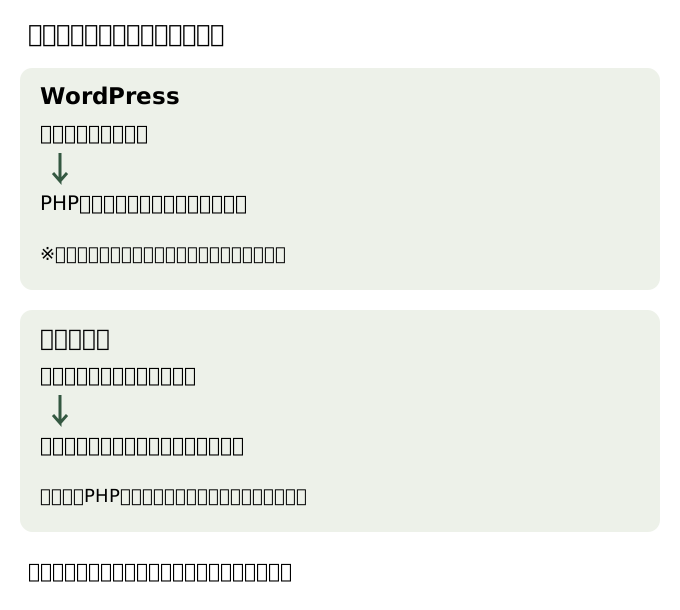
Option 1: Continue with WordPress and review maintenance
If you find the current editing screen and features comfortable to use, you have the option to continue. Plugins are components that add functionality. Decide who will be in charge of updating the main unit, plugins, theme, and PHP, and the procedure for restoring from backup.
When entrusting maintenance to a maintenance company or managed service, check the scope of the work, including whether they will be able to deal with plug-in issues and recovery.
Reference: WordPress official safety guide
Option 2: Use a managed CMS or site creation service
CMS is a system that allows you to create and manage articles from a browser. If it is a managed service, you may be able to leave the maintenance of servers etc. to the operator. The scope of responsibility varies depending on the service.
In addition to the editing screen, ease of use in Japanese, necessary functions, and pricing, we will check whether you can export articles and images and move to another service. We will not rank specific services in terms of safety here.
Option 3: Make it a static site
A static site is a method of distributing pre-made pages. Sites that mainly publish text and images are candidates. On the other hand, the posting screen must be prepared separately.
There are ways to directly edit page files called HTML, use tools that generate pages from manuscripts, and combine them with a CMS for editing. The more you compensate for the ease of updating, the more mechanisms you have to maintain.
Cloudflare has services for page distribution and security measures, but just selecting Pages or Workers Static Assets does not provide a posting screen like WordPress. ``How to write articles'' and ``where to distribute pages'' are considered separately.
| What I want to focus on | Direction to consider |
|---|---|
| Want to easily post on your smartphone or browser? | Easy-to-use CMS with WordPress continuation or editing screen |
| I want multiple people to edit and approve | CMS with permission management and approval functions |
| Mainly text and images, and files can be edited as well. | Static HTML or page generation tool |
| Membership/payment/purchase history required | Consider including dedicated services and dynamic processing |
Reduce attacks in advance with Cloudflare's WAF
Cloudflare has a WAF that inspects suspicious communications before the site. It plays a role similar to security at a reception desk, and can block communications that resemble known attacks, and restrict access by source or number of times it is sent.
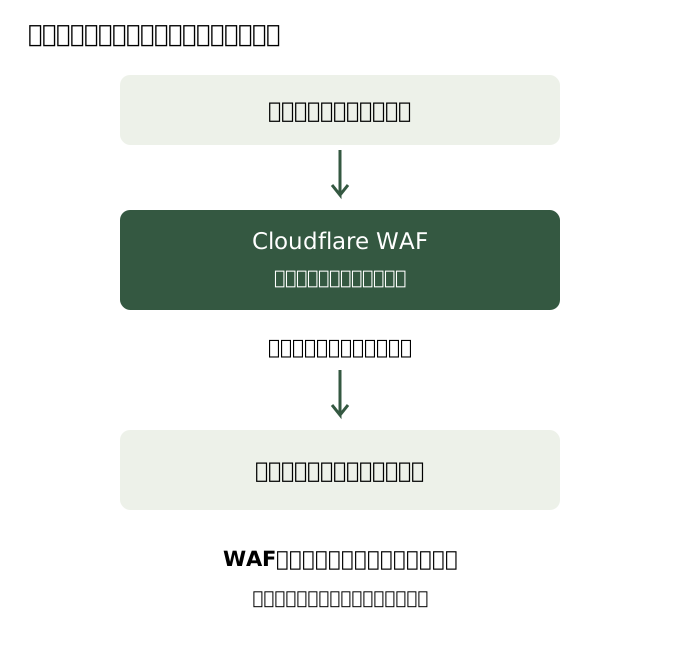
Free has rules for some threats, and Pro and above have a wider range of managed rules. Managed rules are judgment rules prepared and updated by Cloudflare. DDoS countermeasures are countermeasures against attacks that make a site unusable due to a large amount of traffic.
Protection rules for this PHP vulnerability have also been made public. However, there are application conditions depending on the settings, and it is a countermeasure against known attacks. It is not possible to conclude that if you use Cloudflare, you do not need to update PHP.
Reference: WAF feature comparison / WAF countermeasures and conditions for this PHP vulnerability
If the original server is located separately, measures are also required to prevent bypassing the WAF by directly accessing that server. Even for static sites, take into consideration issues such as hijacking of public accounts, problems with external services, and unsolicited form submissions.
Just make an inquiry and let Cloudflare handle it.
This does not mean that you cannot make inquiries on a static site. The page remains static, and you can add processing only to the part that accepts inquiries.
Workers is a service that runs small programs such as form reception on Cloudflare. Turnstile is a mechanism to reduce sending by bots, and Email Service is responsible for sending notification emails.
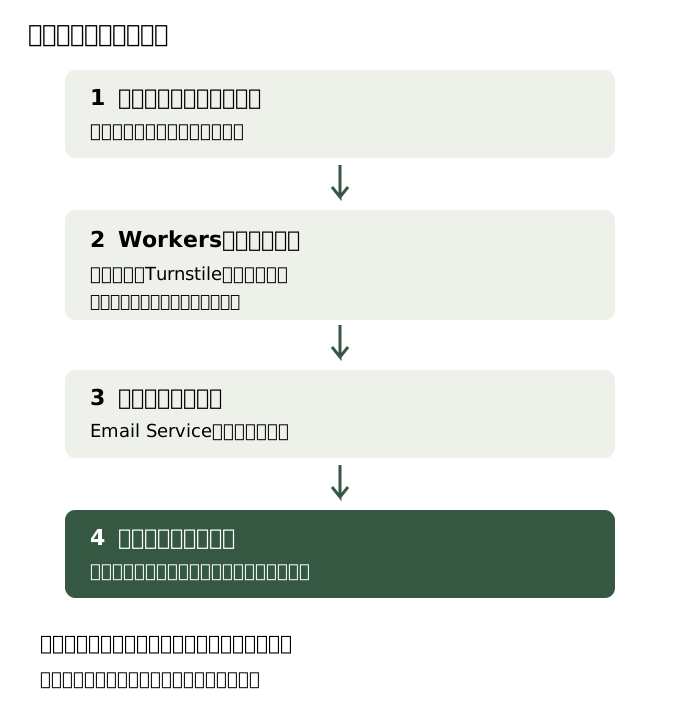
Sending an email is free if you just want to notify a verified administrator address. To automatically reply to inquirers, use Email Sending and Workers Paid, which can be sent to any recipient. Email Sending is in beta at the time of information confirmation.
Email Routing is a service that forwards emails addressed to your own domain to your existing inbox. It does not provide an inbox per se for reading emails. Also, notifying the administrator from a form and forwarding emails to your own domain are separate functions.
In order to avoid losing inquiries, we also design guidance in the event of a transmission failure, handling of retransmissions, and confirmation of receipt. It is also important not to ask for too much confidential information in a form, and decide where to save it, who can view it, and how long it will be kept. If you have an existing email service, make sure that you do not accidentally change the DNS settings that determine recipients.
Turnstile requires JavaScript in your browser. We will provide you with alternative contact methods so that you can contact us even if the request is invalid or the transmission fails. The site text and table of contents can be separated from the form and configured to be readable in regular HTML.
Reference: How to validate Turnstile / Email Service overview / Configure email forwarding
How much does it cost for general use/corporate use?
The following is a configuration example assuming a static site with one domain and a small inquiry form. Does not include additional services such as CMS posting screen, membership/payment functions, attachment storage, monitoring/resending. If you want to keep WordPress, you will need to pay for the server separately.
Amounts are in US dollars as of October 25, 2026. Taxes, exchange rates, acquisition and renewal of unique domains, inboxes, and labor costs for production and maintenance are not included. Think of it as ``minimum monthly fee + amount beyond the included usage''.
General use: If you only want to notify the administrator, start with the free tier.
For personal blogs, hobby sites, etc., it would be nice to be able to see inquiries in your own inbox. There will be no automatic reply, and the transmission result will be displayed on the screen.
| Purpose | What to use | Estimated monthly fee |
|---|---|---|
| Page delivery | Pages/Workers Static Assets | $0 |
| Entrance safety measures | Website Free Plan | $0 |
| Anti-bot measures | Turnstile Free | $0 |
| Inquiry reception | Workers Free | $0 (within free tier) |
| Administrator notification | Send to confirmed destination | $0 |
| Approximate total | $0 (free tier/limited) | |
Whether the free tier is sufficient depends not only on the number of accesses, but also on processing time and implementation. Even if the notification email to the administrator is free, there are other restrictions on the execution of the reception program.
Corporate use: Add auto-reply and paid WAF
This is an example of returning a reception email to the inquirer and using broader WAF rules. This does not mean that you necessarily need this plan just because you are a company. Choose according to the role of the site and the impact of outage.
| Purpose | What to use | Estimated monthly payment |
|---|---|---|
| Page delivery | Pages/Workers Static Assets | $0 |
| Paid WAF etc. | Website Pro Plan | $25 |
| Anti-bot measures | Turnstile Free | $0 |
| Reception/Automatic reply | Workers Paid+Email Sending | Minimum $5 |
| Administrator notification | Send to confirmed destination | $0 |
| Approximate total | Minimum $30/month + excess usage | |
Workers Paid includes a monthly email sending allowance of 3,000 emails with a base price of $5/month minimum. Overage is $0.35 per 1,000 emails. Sends to confirmed administrators are not included in this frame. As resending and other purposes also use the sending quota, there is no guarantee that we will be able to receive 3,000 inquiries.
Comparison including annual payment and Business
| Configuration example | Basic monthly fee | Monthly conversion for website plan paid annually |
|---|---|---|
| General use: Free + Workers Free | $0 (within free tier) | $0 (within free tier) |
| Add automatic reply: Free + Workers Paid | Minimum $5 | Minimum $5 |
| Corporate usage example: Pro+Workers Paid | Minimum $30 | Minimum $25 value |
| If requirements are strict: Business + Workers Paid | Minimum $255 | Minimum value of $205 |
Annual payments for Pro are $240/year, and annual payments for Business are $2,400/year. A minimum of $5/month for Workers and excess usage will be charged separately. This is not a contract where you pay the monthly equivalent amount shown in the table every month.
Business has an SLA (contractual agreement regarding uptime) for website plans, but this does not guarantee the entire system, including form processing and email delivery. If continuous operation is important, evaluate failure detection, failure recovery, and handling of beta features.
Workers Paid is a plan for program execution, etc. Pro/Business is a plan for websites such as WAF. Even if you subscribe to Workers Paid, paid WAF is not automatically attached.
Requests for static files are free and unlimited, but there are restrictions on the number of files, capacity, etc. WAF is assumed to be set to an applicable route such as the target's own domain, and care must be taken when accessing from another public URL.
Before migrating, check whether there will be any problems before considering the price.
If updating every time becomes a burden after migration, it will be difficult to continue using the site. We think it's a good idea to first try posting and publishing a small number of articles.
- Update:Can the person in charge write the article, add images, and publish it?
- Existing page:Can the previous URL be maintained? If I want to change it, can I be guided/redirected from the old URL?
- Attached functions:How to carry over comments, search, categories, RSS, forms, etc.
- Recovery:If you publish incorrect content, can you return to the previous state?
- Export: Can articles and images be backed up and moved elsewhere in the future?
- Management:Can the account be managed by multiple people? Can I set up multi-factor authentication?
There is also a way to continue using WordPress and set up a maintenance system. You can leave this to a managed service, or you can make the publishing side static. I would like to select the configuration that suits my site by checking the necessary functions and the scope of continued updates and maintenance.
The illustration is an explanatory diagram created for this article. Prices and conditions of provision are subject to change.